Koyeb Sandboxes are currently in public preview.
The Lifecycle of a Koyeb Sandbox
Sandboxes provide fully isolated, secure environments to safely execute AI-generated and untrusted code at scale. Sandboxes can be created on the fly and should be ultimately deleted when they have completed their tasks. To learn more about the philosophy and purpose of sandboxes, view the introductory documentation.
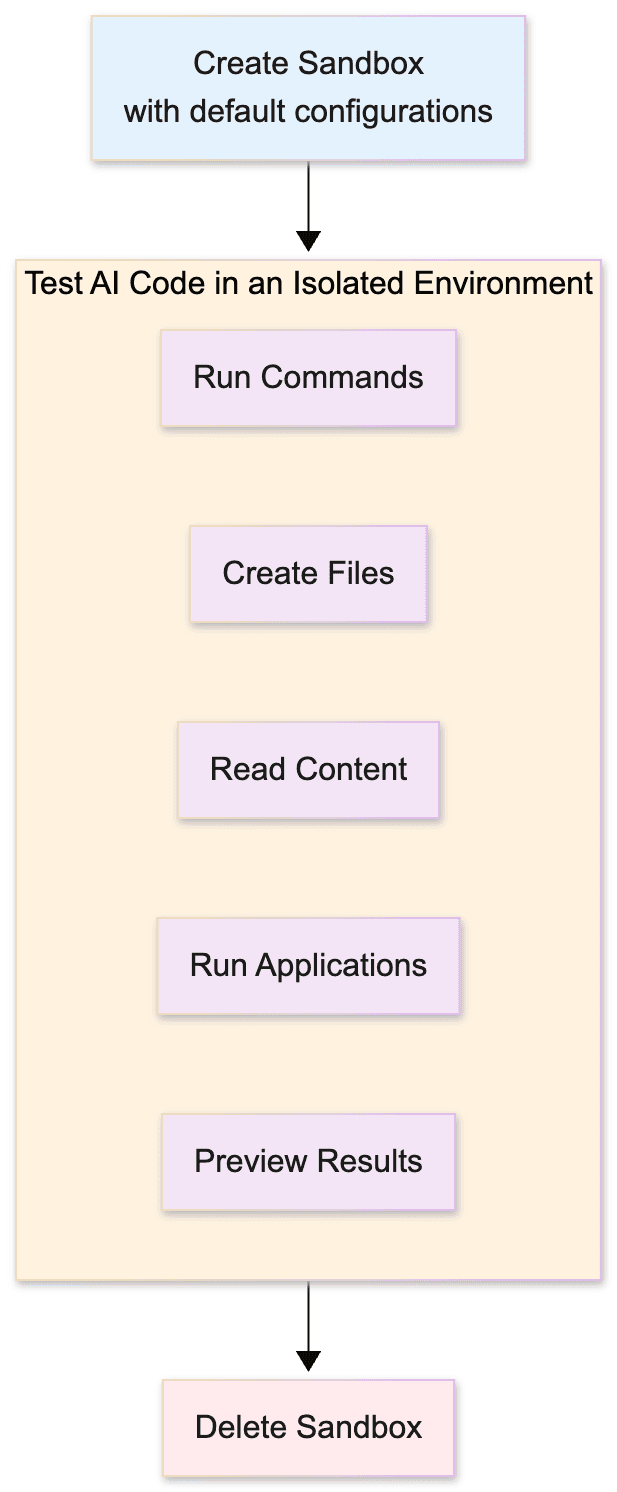
Create a sandbox
Sandboxes are created programmatically using the Koyeb Python SDK.
Calls to the Koyeb Python SDK must be authenticated using a Koyeb API Token. Complete the following steps to generate the token and make it accessible to your environment:
- In the Koyeb control panel, navigate to Settings (opens in a new tab).
- Click the API tab.
- Click Create API token and provide a name and description.
- Click Create to complete token creation. Note that the token value will not be accessible later, so take note of it as needed.
- In the terminal, set the API token to be accessible to your Python environment, either through an environment file or terminal command. For example:
Then in the Python application, access the token using the following code:
export KOYEB_API_TOKEN="YOUR_API_TOKEN"api_token = os.getenv("KOYEB_API_TOKEN")
Create a sandbox synchronously
To create a sandbox, use the Koyeb Python SDK's Sandbox.create method, passing the Docker image identifier from Docker Hub, a name you choose, wait_ready set to True to wait to continue actions until the sandbox is up and running:
from koyeb import Sandbox

sandbox = Sandbox.create(
    image="ubuntu",
    name="example-sandbox",
    wait_ready=True,
)

sandbox_id = sandbox.id
print(f"  Sandbox ID: {sandbox_id}")
Thie creates a sandbox object that can be used to take actions.
Create a sandbox asynchronously
To create and manage a sandbox asynchronously, use the Koyeb Python SDK's AsyncSandbox.create method:
import asyncio
from koyeb import AsyncSandbox

sandbox = await AsyncSandbox.create(
    image="ubuntu",
    name="example-sandbox",
    wait_ready=True,
    api_token=api_token,
)

sandbox_id = sandbox.id
print(f"  Sandbox ID: {sandbox_id}")
Thie creates a sandbox object that can be used to take actions. With this method, all future actions that the sandbox takes will be conducted asynchronously.
Retrieve a sandbox
When you create a sandbox, you can use its reference to take actions directly. For example, the following code executes a syncrhonous command on the sandbox:
result = sandbox.exec("echo 'Hello World'")
print(result.stdout.strip())
If you need to retrieve a reference to a sandbox (e.g. your client app gets disconnected and needs to reconnect to the sandbox) you can use the get_from_id function, passing the sandbox's .id attribute.
The following shows retreiving a sandbox synchronously:
sandbox = Sandbox.get_from_id(
    id=sandbox_id, # value saved from earlier
    api_token=api_token,
)
The following shows retreiving a sandbox asynchronously:
retrieved_sandbox = await AsyncSandbox.get_from_id(
    id=sandbox_id, # value saved from earlier
    api_token=api_token,
)
Take actions on a sandbox
You can take several actions on your sandbox, allowing you complete control over the environment:
- File operations: Reading, writing, moving, copying, renaming, deleting files and directories. View the documentation on file operations
- Run commands: Executing commands, streaming output, managing environment variables, managing background processes. View the documentation on running commands
- Expose ports for external calls to an endpoint.View the documentation on exposing ports
Delete a sandbox
To immediately delete a sandbox, use the .delete() function:
sandbox.delete()When using sandboxes asyncronously, you can call the delete() function with await:
await sandbox.delete()Auto-deletion and lifecycle management
You can automatically delete Sandboxes based on user-defined periods. Deletion can be configured to occur after creation or after a period of inactivity when the sandbox is scaled to zero.
To automatically delete a sandbox after a delay following creation, set the delete_after_delay parameter with an appropriate value in seconds.
# Sync

from Koyeb import Sandbox

sandbox = Sandbox.create(
            image="ubuntu",
            name="example-auto-delete",
            wait_ready=True,
            api_token=api_token,
            region="fra",
            delete_after_delay=60, # go to deletion after 60 seconds
        )
To automatically delete a sandbox after a period of inactivity, set the delete_after_inactivity_delay parameter with an appropriate value in seconds. The timer starts when the sandbox is scaled to zero and is aborted in case the sandbox wakes up.
from Koyeb import Sandbox

sandbox = await Sandbox.create(
            image="ubuntu",
            name="example-auto-delete",
            wait_ready=True,
            api_token=api_token,
            region="fra",
            idle_timeout=300 # go to deep sleep after 5 min,
            delete_after_inactivity_delay=300 # delete 5 min after inactivity
)

# sandbox deletion will occur after 10 minutes
To update the auto-deletion configuration of your sandbox during its execution, you can call the .update_lifecycle() method
sandbox.update_lifecycle(delete_after_delay=120, delete_after_inactivity_delay=600)For all plans (Starter, Pro, and Scale), auto-deletion can be configured with a minimum delay of 60 seconds and a maximum of 24 hours, or 12 hours after scaling to zero